Every quarter, somebody hands you a list of AI features to evaluate. Fivetran’s AI-assisted connectors. Snowflake Cortex. dbt Copilot. Whatever the BI vendor renamed their NL feature to last week. The list looks reasonable, the demos work, and the question that emerges is “which of these should we adopt?” Six months later you have eight AI features deployed across the stack and trust in numbers is worse than it was before, because the LLM in the chatbot says one thing, the AI summary above the dashboard says another, and the auto-generated alert email says a third. Nobody can tell which one is right. Several of them are.
The shopping-list exercise is a real one. Every data org has to decide where AI fits, and the vendor pitches make those decisions feel pressing. The trap is treating it as a vendor question before deciding where each kind of AI compute belongs in the stack, and how the language outputs across the stack stay consistent with the structured outputs underneath.
“What AI features should we adopt” is a vendor question. The architectural question is where each kind of AI compute belongs and what grounds it, and it is the one that decides whether your AI investments compound or corrupt the data product. Place AI in the wrong layer and it gets expensive, slow, and untrustworthy. Place it in the right layer with no grounding contract and it makes things up. Place it correctly, ground it against the same canonical metric definitions as your BI and your reports, and it earns trust the way the rest of the stack does.
This is the argument, in three parts. AI compute has a natural placement at each layer of the stack, and placement is more consequential than feature selection. The semantic contract, often implemented through dbt or a metric API, is the grounding contract for AI features, the same way it is the grounding contract for BI surfaces; drift between AI features is the same problem as drift between dashboards, only harder to detect, because the symptoms are language, not numbers. And in the client portal where dashboards and reports live, AI shows up as alerts, summaries, and chat. Each earns its place by doing something the deterministic layer cannot, and none of them get to invent metrics.
AI by layer: placement is the question
Working bottom up.
Fivetran, or whatever your ingestion layer is. The temptation is to do “AI-driven data quality” at the connector. Resist it. Use the vendor’s AI features for what they are good at: schema-drift alerts, anomaly detection on row counts, AI-assisted connector creation. Stop there. Data-quality logic with semantic stakes (this respondent is suspicious, this batch should be excluded from reports, this null means absent rather than unknown) belongs in dbt, where it is testable, version-controlled, and auditable. A vendor’s black-box quality model that drops rows for reasons you cannot reproduce is the kind of dependency that breaks during a stakeholder review and leaves you unable to explain why.
Snowflake, or whatever your warehouse is. This is where most of your AI compute should live, because the data is already there and governance gets easier when nothing leaves the boundary. The pieces that earn their keep:
Cortex Search for retrieval over program docs, item glossaries, methodology notes, and historical reports. This is the RAG primitive everything else builds on. Don’t build your own.
ML Functions (anomaly detection, forecast, top insights) for the deterministic “something is unusual” detection. This is the workhorse for alerts: cheap, batch, no LLM required. Most “AI alerts” should start here, with an LLM only on top for copy.
Cortex Analyst, or whichever text-to-SQL surface your warehouse offers, for analyst-facing exploration, only when fed your dbt semantic layer as the YAML model. Without that grounding it invents metric names. Don’t expose it to clients in v1.
Cortex COMPLETE / SUMMARIZE / EMBED_TEXT for narrative generation and embeddings, used inside warehouse-native apps when PHI needs to stay in place.
Document AI if you have any PDF intake (consent forms, partner packets, prior reports) that you’d otherwise extract by hand.
The architectural rule: deterministic statistics and search live in the warehouse. Open-ended language generation can live there too if PHI matters, but more often it lives in the application layer, where you can swap models and version prompts independently of your data platform.
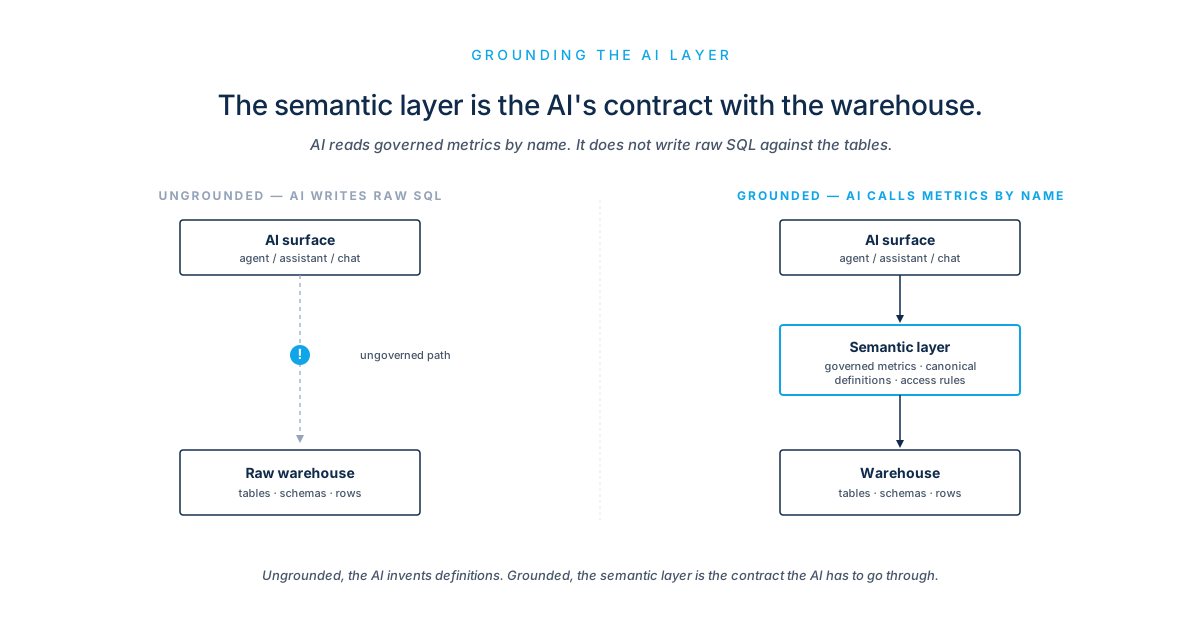
dbt. dbt Copilot for model and test generation is fine but minor. The real AI play at this layer is the inverse: making the dbt project legible to AI features. Every metric definition becomes a tool description, every domain a typed entity, every test a guardrail. The MCP server pattern, or whatever your equivalent is, lets a chatbot call get_domain_score(school_id, domain_id, wave_id) instead of writing SQL. That single move eliminates most of the hallucination risk in a portal chatbot, and the setup work is mostly already done. You just have to decide that the dbt semantic layer is the canonical contract every AI feature reads through.
BI tools. Tableau Pulse, Power BI Copilot, ThoughtSpot Spotter, Looker Explore Assistant are all variants of “ask a question, get a chart.” Useful for internal exploration. Bad for client-facing surfaces, for the same reason BI tools are bad at the publication problem: they read directly from BI semantic models, which drift from your dbt semantic layer the moment a Tableau analyst adds a calculated field. The BI tool’s job is rendering the dashboard. If you want chatbot-style features in your client portal, build them against the dbt semantic layer through your own API, not against the BI tool’s NL interface. AI goes around the BI tool, not through it.
That is the placement story, one paragraph per layer. Grounding, which is the next part, is where most stacks come apart.
The semantic layer is also the AI contract
The keystone argument from the companion piece, Three Surfaces, One Keystone, extends one step. There, the claim was that all three reporting surfaces (program report, operator console, executive view) must read from a single dbt-defined semantic layer or they drift, and drift is the failure mode that kills trust.
The same argument applies, more strongly, to AI features. Three reasons.
The drift surface is bigger. With BI tools you have a small number of dashboards, each owned by an analyst who can be talked to. With AI features you have potentially every alert, every summary, every chatbot answer, every auto-generated email, each of which can independently drift from the canonical metric. There is no single owner to call.
The drift symptom is language, not numbers. When two dashboards show different numbers, somebody notices. When a chatbot says “Domain 4 is improving at most schools” and an alert email says “Domain 4 has plateaued,” nobody catches it for months. The discrepancy is buried in prose, and prose is harder to diff than numbers.
The drift cost is reputational. A wrong number in a dashboard is embarrassing. A wrong claim in an LLM-drafted email to a school is a brand-existential risk in a regulated or sensitive domain.
The mechanism that prevents this is the same as before, applied to a different consumer. Every AI feature reads metrics through the dbt semantic layer, exposed as a typed metric API. The chatbot calls get_domain_trajectory(...), gets typed JSON back, and renders it. The alert generator pulls a row from marts.f_school_domain_wave and feeds it to the LLM as the only input the model can see. The AI summary card on the dashboard reads the same row the dashboard rendered from, and the LLM has no tool access, only the snapshot.
In every case the LLM is producing language about a structured input. It is never the source of truth for any number it mentions. The semantic layer is.
This is the discipline that makes the rest of the AI architecture safe. Without it, every AI feature is a small bet that nobody on the team will let it drift. With it, drift is structurally prevented because there is nothing to drift toward.
In the portal: three AI surfaces
In the React/Node client portal where embedded dashboards and reports live, AI shows up in three places. Each has a job, a failure mode, and a cost profile.
Alerts
The “your report is ready” alert is mostly mechanical. The portal already knows which report, which school, which cycle, from a report.published event emitted by a warehouse task. The AI value is a one-line preview (“Spring Cycle 2026, fourteen schools, biggest movers in Domain 4”), generated from the structured snapshot. Use a small model. Cache aggressively. The same alert goes to many recipients.
The “your next phase is coming” alert is calendar-driven, not AI-driven. The schedule is in your data. AI value is personalization: drafting a message that references what the school did in the prior cycle and what to prepare for. Optional but high-leverage for engagement.
The “you should look at this” alert is where AI does real work. The signal comes from the deterministic anomaly or trajectory layer: warehouse ML functions, or your own materialized f_trajectory table. The AI generates the interpretation of that signal: “Domain 3 at School X dropped into declining with high confidence. Recommended next action: review trusted-adult training participation.” That paragraph is grounded on a single structured row plus a playbook reference, snapshotted in the audit log alongside the alert ID.
The pattern across all three: detection is deterministic, interpretation is generative. Don’t let the LLM decide what to alert on. Let it decide how to phrase the alert, given a structured event payload.
AI summaries on dashboards
Above each embedded BI view, render a card that calls your portal’s narrative service. The service takes the same metric snapshot the dashboard rendered from, runs it through a prompt with the program glossary and benchmarks attached, and returns two or three sentences. The card shows the summary, a “regenerate” button (rate-limited), and a citation back to the metric snapshot.
The implementation rule that makes this safe: the LLM has access only to the structured snapshot. No tool use, no follow-up queries, no SQL generation. That bounds the failure mode: at worst a confused summary built from the right row, not a confident number drawn from the wrong data.
Chatbot
Most portal chatbots fail because they try to be helpful about everything. The version that works has narrow, explicit scope, and the LLM is wrapped in tool-use, not given freeform SQL. In practice the scope shrinks to a handful of permitted intents.
Program documentation. RAG over a Cortex Search index of program docs, item glossaries, methodology notes. Low stakes, high value.
Metric lookup. The chatbot calls typed tools (get_school_summary(school_id, wave), get_domain_trajectory(school_id, domain_id), compare_to_norm(school_id, domain_id)) defined as wrappers over the dbt semantic layer. The model receives structured JSON and renders it. No SQL generation in the user path.
Report status. “When is my Spring report ready?” looks up f_report_publication, returns state.
Anything outside those scopes routes to a human, or to an “I can’t answer that, want me to flag it for your program lead?” response. The temptation to use full text-to-SQL on the user-facing chatbot is real and should be resisted in v1. It is the right tool for an internal analyst console, the wrong tool for a client portal where the surface area is too large to keep grounded.
Every chatbot answer that includes a number must show the source row it pulled from, with a “view underlying data” link. A school superintendent who can’t see where the number came from won’t use it twice.
The architecture in one paragraph
The warehouse holds the data and runs deterministic AI: anomaly detection, trajectory classification, search over docs, embeddings. dbt defines the semantic layer that everything else reads through. A Node service exposes a metric API and an event spine; the metric API wraps the dbt semantic layer, the event spine routes warehouse-emitted events (report.published, phase.due_soon, trajectory.changed, anomaly.detected) to subscribers. AI features in the portal (chatbot, alert copy, summary cards, phase guidance) call into the metric API for grounding and into a model gateway for generation, with outputs snapshotted into an audit table. The React portal embeds BI dashboards as opaque panels and renders the AI features around them. The BI tool’s own AI features are unused, or used only by internal analysts. There is one canonical computation per metric, one canonical event per state change, and one canonical audit row per AI-drafted output.
The operational principles
A handful of rules that make all this scale, in rough priority order.
One semantic contract. Every AI feature reads metrics through the same dbt-defined API. Chatbot, alert generator, AI summary, operator console, internal analyst console. All of them go through get_domain_score(...) or its equivalent, never raw SQL. This is the keystone applied one level up.
Pre-compute when possible, generate when needed. Most “AI insights” are pre-computable rules with LLM-drafted prose on top. Trajectory classification is deterministic; the explanation is generated. Anomaly detection is deterministic; the alert copy is generated. Resist building “live AI” anywhere a cached version would do; it is cheaper, faster, and audits more cleanly.
Grounded generation everywhere. Every LLM output that includes a number comes from a structured input row, snapshotted alongside the output. If the metric layer changes, you can re-render the narrative. If a stakeholder asks where a sentence came from, you can answer in seconds.
Schema-constrained output. When the LLM is producing anything structured (alert payloads, classification calls, action recommendations), constrain the output schema. JSON mode, function calling, or guidance/outlines libraries. Free-text generation is for narrative only, never for control flow.
Async by default. Don’t put LLMs in the critical path of a page load or a notification dispatch. Generate copy on schedule or on event, store it, render the cached version. Streaming chat is the exception, and even there have a non-streaming fallback.
Cost and latency budgets per surface. Different AI surfaces tolerate different costs. Chatbot answers can be slower but expensive; alert copy needs to be cheap because volume is high; AI summaries on dashboards need to be cached because they render on every page open. Put numbers on these before building.
Audit trail for AI outputs. Same publication-snapshotting pattern as the companion piece on reporting surfaces, extended. Every AI-drafted alert, summary, narrative, and chatbot answer gets a row recording prompt template version, model name and version, input snapshot, output, timestamp, recipient. This is decision observability applied to AI: for any decision the system shaped, you can say what the model saw, what it produced, and which version of which prompt stood behind it. A decision you cannot reconstruct is a decision you cannot defend. In a regulated or sensitive domain, that is the difference between an answerable question and an unanswerable one.
Read-only by default. No AI feature writes to the database without a human approval state. Even “schedule the next phase” or “assign this action” should land in a draft state for a program lead to confirm.
What to skip in v1
A few things that look obviously AI-shaped but cost more than they return.
Generative dashboards: LLMs producing a new chart for every question. The trust math isn’t there yet, and your audience can’t tell good charts from bad ones at a glance. Stick with curated dashboards plus AI summaries above them.
Free-text NL-to-SQL in the user-facing chatbot. Fine for an analyst who can sanity-check the SQL; a liability for a client whose first run-in with a wrong answer is the only one that counts. Use typed tool calls into the metric API instead.
Voice or multi-turn agentic chat. Single-turn, scoped Q&A works in a regulated context. Agentic loops are a brand risk before they’re a feature.
LLM-generated subject lines as A/B tests. Tempting, low-stakes, but you’ll spend more time monitoring quality than you save.
Closing
Most AI architecture conversations begin with vendor selection. The version of the conversation that produces a system you can trust starts upstream of that, with three questions in order.
- 01Where does each kind of AI compute belong, given the data, the governance, and the latency profile of the surface that consumes it.
- 02What grounds every output: what is the canonical contract every AI feature reads metrics through.
- 03Which features earn their place, given that detection is deterministic, interpretation is generative, and language costs more to verify than numbers do.
If those three questions have clean answers, the vendor question is small. Cortex, Claude, GPT, an open-weights model behind a gateway: the choice barely matters once placement and grounding are decided. If they don’t have clean answers, no vendor will save you, because the stack you build will drift and the AI features will accelerate the drift.
Place compute by layer. Ground language by contract. Snapshot everything that generates.
The keystone hasn’t changed. The surface has.
Every AI feature is a small delegation of a decision to a model. The architecture’s whole job is to keep those delegations deliberate: placed on purpose, grounded against one source of truth, observable after the fact. Where AI authority sits in a workflow is a design choice. Make it, rather than inheriting it from whichever vendor demo shipped last. That is what it takes to carry a data stack from fragmented to decision-ready, with the AI layer held to the same standard as everything beneath it.
Written May 2026 for the Analytic Bytes Library. Tool capabilities, product names, and feature specifics cited reflect that period; the architectural argument is intended to outlast specific vendor features.
Questions, pushback, or a problem that looks like this one? Write to chai@analyticbytes.systems.